
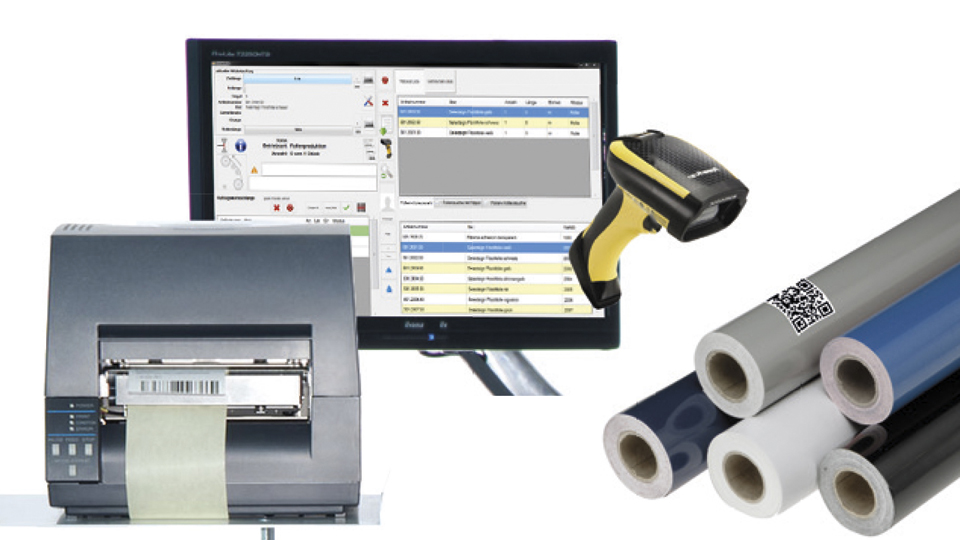
Our software does more than just integrate Film Logistics with your ERP system. It automatically prints barcode labels after every conversion process.
The labels allow you to know exactly how much is left on the master roll, thereby avoiding errors when dispatching the customer’s roll. Ultimately, this leads to less material wastage, fewer replacement deliveries to customers and makes stock-taking easier.
Boost pressure – the possibilities
As a rule, one copy of both the stock label and the customer label is printed for each order. The number of labels can be changed. If, for example, a roll is to be stored in a box, it makes sense to print two labels so that the information on the remaining length of the vinyl film is clearly visible both on the vinyl film itself and on the outside of the box. Similarly, you might wish to print two copies of the customer label as well – for example, to use one label to seal the roll and stick the second onto the core or the delivery note. A further setting allows you to specify that the quantity within a job should be ignored and that only one label should be printed for the entire job. This is particularly useful for sheet-fed printing. If 100 sheets are produced, the system should not generate 100 labels, but just one for the entire job. Label printing can be paused completely. Conversely, even if a job has not been carried out, manual label printing for it can be performed at any time.
The Label Editor
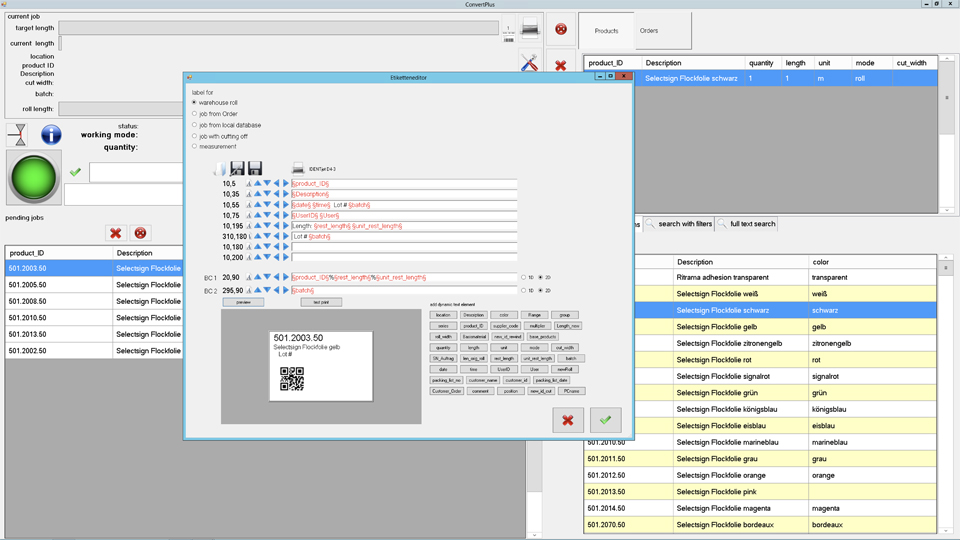
Labels can be freely configured and designed in ConvertPlus2. There are a total of five different label designs for the various operating modes, as well as for warehouse rolls or customer rolls. In the editor, individual functions can be added via buttons and supplemented with text. The font and font size can be selected from the system fonts. You can set how far lines should be indented at the top and left. There is also a barcode field available for free use. It can be populated with a 1D or 2D code containing any content.
Find out more in this video (from 19:20)
https://www.youtube.com/watch?v=DbZMccRk_Ig